
A perspective piece from The Listening Market
The shift to working from home was once treated as a temporary arrangement, a stopgap between office buildings. Somewhere along the way it stopped being temporary and became simply the way a large share of the working population spends their days. Yet the spaces people work in have often lagged behind that change. Kitchen tables became desks. Bedrooms doubled as meeting rooms. Laptop screens sat at the wrong height for months on end. Creating a productive work-from-home setup is not about building a showroom office. It is about quietly removing the frictions that drain focus, so the work itself becomes easier to settle into.
The starting point is less obvious than it seems. Most advice about home workspaces begins with furniture, but the more honest place to begin is with the question of what the space is actually for. A person who spends their day on video calls needs something different from someone who writes for hours in silence. A setup that serves focused, individual work differs from one built around collaboration. Before buying anything, it helps to sit with the reality of the working day and notice what gets in the way. Is the laptop screen too low? Is there glare from a window? Does the chair encourage slouching after the third hour? The answers to these ordinary questions shape the setup far more than any product list.
Light and the Unseen Energy of a Room
Natural light changes how a space feels over the course of a day. A room that starts bright and gradually dims can gently cue the body toward the rhythms of focused work. Positioning a desk near a window, where the side light falls across the workspace rather than directly behind a screen, reduces eye strain in a way that artificial lighting alone cannot match. When daylight fades, the quality of the artificial light matters more than its brightness. Warm, diffused light creates a calmer atmosphere for evening work than the flat, bluish glare of a single overhead bulb. The goal is a room that feels like a place to think, not a place to be processed.
A Surface and a Chair Worth Sitting In
The desk and the chair are the two pieces of equipment a person touches most. Neither needs to be expensive, but both need to fit the body that uses them. A desk at the wrong height forces the shoulders to rise or the wrists to bend, and that tension accumulates quietly over weeks. An adjustable chair that supports the lower back and allows the feet to rest flat changes the experience of a long working day more than almost anything else. For those who alternate between sitting and standing, a height-adjustable desk or a simple converter can break up the posture of the day. The body was not designed to hold one position for eight hours. The best setups make movement natural rather than something that requires effort.
The Screen, at the Right Height
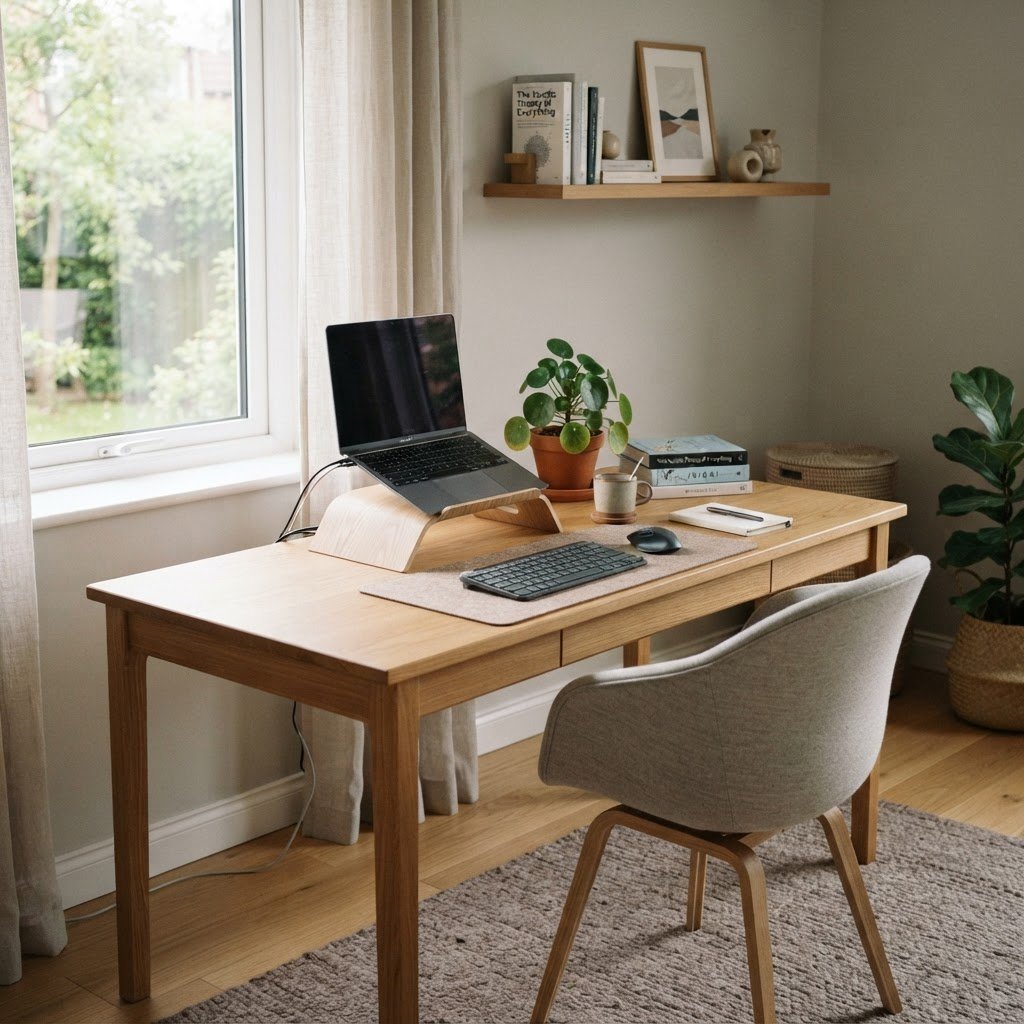
One of the most common mistakes in home workspaces is a laptop screen positioned at desk level. Looking down at a laptop for hours tilts the head forward, strains the neck, and compresses the spine. Raising the laptop to eye level with a simple stand or a stack of books, then adding an external keyboard and mouse, is one of the cheapest and most effective changes a person can make. The screen should sit at a height where the eyes look slightly downward at the top third of the display, and the distance should allow the arms to rest comfortably. For those who use two screens, placing the primary screen directly ahead and the secondary screen to one side reduces the constant neck rotation that slowly stiffens over a day.
Managing the Sound of a Home
Homes are not designed for silence. Refrigerators hum, neighbours mow lawns, and delivery drivers knock at the worst possible moment. The way sound behaves in a home workspace shapes concentration more than most people realise. Soft furnishings, a rug under the desk, curtains rather than blinds, and even a few books on open shelves absorb the hard reflections that make a room feel echoey. Noise-cancelling headphones are not a luxury for many home workers but a practical tool for carving out a pocket of quiet in a household that has its own rhythms. For those on calls, a dynamic microphone positioned close to the mouth picks up the voice and leaves the background where it belongs.
The Quiet Power of Background Scents and Temperature
The environment a person works in is more than what can be seen. A room that runs hot in the afternoon or cold in the morning creates a slow, ambient discomfort that pulls attention away from the task. A small fan, a heater, or simply opening a window at the right time of day can regulate temperature without the cost of a full system. Scent is a subtler matter. A clean, fresh-smelling space signals calm to the brain in a way that registers below conscious thought. Ventilating the room, keeping plants that filter the air, and avoiding strong artificial fragrances creates a baseline that supports focus rather than competing with it.
Storage and the Visible Workspace
Clutter is not a moral failing, but a desk covered in unrelated objects competes for attention at a low level all day long. The productive home setup finds a balance between the sterility of an empty surface and the chaos of a desk that holds everything. A few drawers, a shelf within arm’s reach, or a simple tray for the items used daily keeps the working surface clear without pushing everything out of sight. The things used most often should be the easiest to reach. The things used rarely should be stored away. The guiding principle is that the desk holds what the work needs, and the rest has a home of its own.
Cables and the Invisible Infrastructure
Cables are the unseen clutter of a modern workspace. A tangle of power cords, charging leads, and display cables draping across a desk creates visual noise and practical frustration. Routing cables behind the desk, using a simple cable tray or clips to hold them in place, and keeping charging points within reach rather than on the working surface transforms the feel of a setup in under an hour. This is not about aesthetics alone. A workspace where the cables are managed is a workspace where the next device can be added without a small crisis.
When the Work Demands Focus
Different kinds of work ask for different conditions. Deep, focused work benefits from a space that reduces the number of decisions the mind has to make. A consistent setup, where the desk faces the same direction and the tools sit in the same place, lowers the cognitive cost of settling in. For work that involves calls and collaboration, the space needs to shift more readily. A secondary light source for video, a neutral background, and a clear path to silence when needed make the transitions smoother. The most productive home workspaces are not rigid. They are designed to accommodate the different modes the day demands.
The Boundary Between Work and Home
One of the quiet difficulties of working from home is that the workspace never fully goes away. The desk sits there in the evening, the laptop on the kitchen bench, the unread messages accumulating in the next room. A productive setup includes a way to close the day. That might mean a desk that faces a wall and can be turned away from when the work ends, a room with a door that shuts, or simply a ritual of clearing the surface and closing the laptop. The human mind benefits from a visible signal that work has stopped. A space that can be left behind, even briefly, is more restorative than one that never changes.
Plants, Air, and the Living Workspace
A few plants in a workspace do more than improve the view. They subtly filter the air, add a sense of life to a room that can feel inert under artificial light, and provide a visual break for the eyes during long stretches at a screen. The kind of plant matters less than the habit of caring for something living in the space. Low-maintenance plants that tolerate the light conditions of the room, placed where they can be seen from the desk without crowding the working surface, create a connection to something growing that desk lamps and monitors cannot provide.
Technology That Serves the Work
The tools that support a home workspace extend beyond the laptop. A second monitor can dramatically expand the space for focused work by allowing reference material and active work to sit side by side. An external keyboard and mouse reduce the strain of a cramped laptop arrangement. A docking station simplifies the daily ritual of connecting and disconnecting. None of these are necessary for every person, but each addresses a specific friction. The principle is to add technology that removes a problem rather than technology that adds a new layer of complexity to manage.
The Ritual of the Day
Perhaps the most overlooked element of a productive work-from-home setup is the way it supports the rhythm of the day. The best setups make it easy to start and easy to stop. A workspace that is ready to sit down at, with the tools in place and the surface clear, removes the small barrier that can delay the start of deep work. A workspace that can be tidied in two minutes at the end of the day creates a clean slate for the next morning. These rituals, repeated day after day, are what turn a desk in a corner of a home into a place where real work happens. The environment becomes a quiet partner in the work, supporting focus without demanding attention, and that partnership is what makes a home setup genuinely productive.
Focus Keyword: productive work-from-home setup
Meta Description: A practical guide to creating a productive work-from-home setup, covering lighting, ergonomics, sound, storage, and the daily rituals that support deep focus.
SEO Title: How to Create a Productive Work-From-Home Setup | The Listening Market